What's New in CB-Dock3
CB-Dock3 extends the capabilities of blind docking by integrating refined computational strategies with updated structural databases. Building on the framework of CB-Dock2, this version implements four key functional improvements designed to enhance prediction accuracy and broaden the scope of applicable targets:
1. Upgraded Docking Engine: FitDock1.2
The docking engine has been upgraded to FitDock1.2, a refined template-based method designed to overcome the limitations of traditional docking.
Stereochemical Precision: FitDock1.2 employs a novel position-swapping strategy and valence angle harmonization. This allows for the precise transplantation of stereochemical features (such as chiral centers and ring conformations) from templates to targets, significantly reducing errors in ligand alignment.
Macrocycle & Peptide Mastery: This enhanced stereochemical handling is particularly advantageous for large, flexible ligands. FitDock1.2 shows significantly improved accuracy for macrocycles and peptides, consistently achieving sub-angstrom RMSD in benchmarks by ensuring faithful reproduction of native-like poses.
2. Metal-Aware Docking
Recognizing that approximately 40% of proteins contain metal ions essential for function, CB-Dock3 now fully supports metal-ion mediated docking. Whether using the FitDock1.2 or AutoDock Vina engine, the presence of metal ions (e.g., Zn²⁺, Mg²⁺, Fe²⁺) is explicitly calculated into the docking simulation. This ensures accurate binding pose predictions for metalloenzymes and signaling proteins, which were previously challenging for standard blind docking servers.
3. Automated Domain Detection & Selection
To handle increasingly complex inputs—such as full-length AlphaFold predictions or large multi-subunit complexes—CB-Dock3 implements an automated domain parsing module. The system intelligently identifies and segments structural domains within the target protein. This allows users to adopt a "divide-and-conquer" strategy, focusing computational resources on biologically relevant subunits and avoiding potential artifacts caused by unstructured regions.
4. Expanded Template Library (BioLiP2)
The backbone of our template-based approach has been updated to the latest BioLip2 database (version of 2025.04.23). This comprehensive update significantly expands our library of high-quality ligand-protein interactions. By incorporating the most recent experimental structures and curated binding data, CB-Dock3 increases the probability of finding suitable templates, thereby enhancing the success rate and reliability of binding site predictions.
How it works
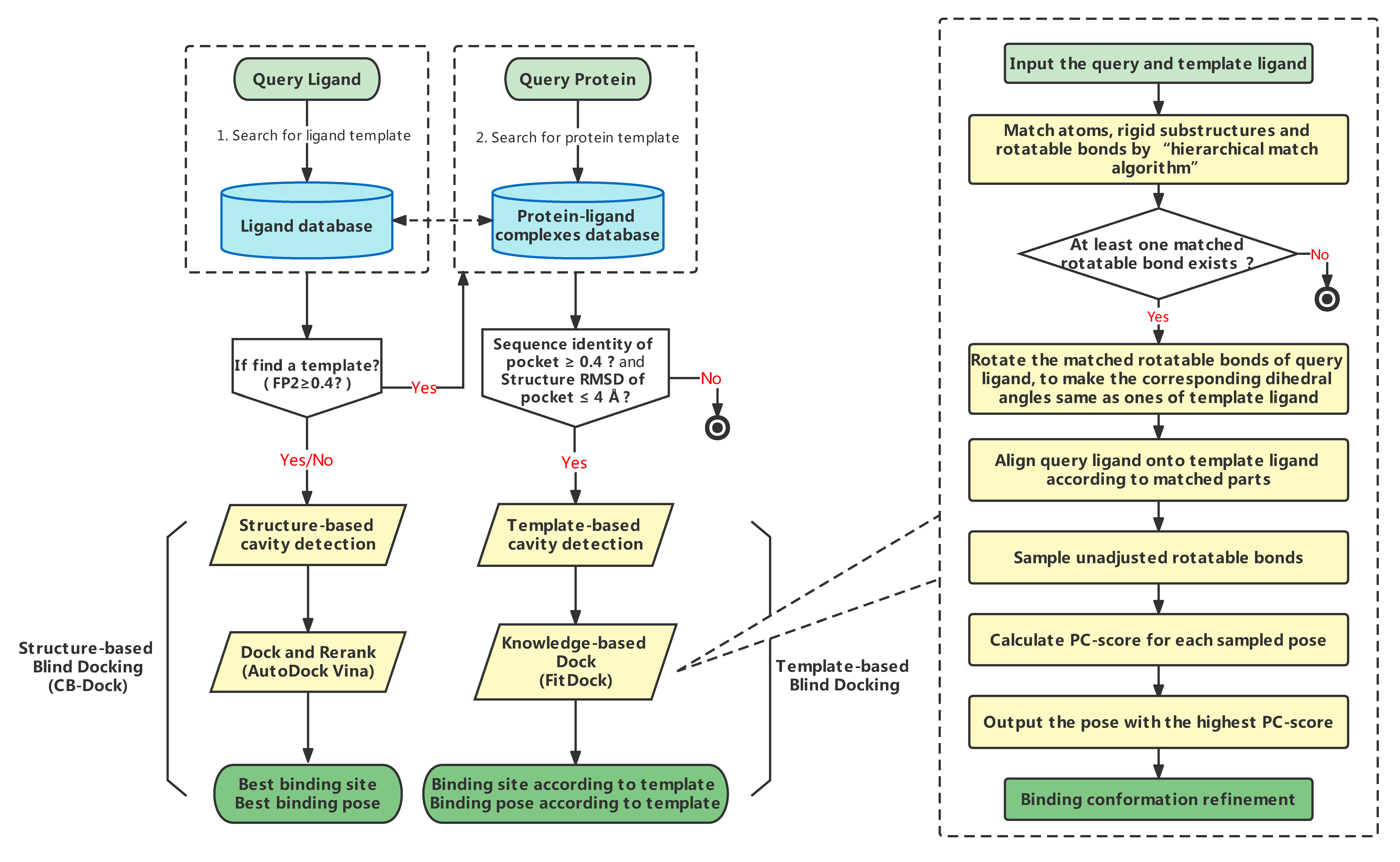
CB-Dock3 advances the blind docking workflow by integrating automated structural analysis with a dual-engine docking approach. It builds upon the curvature-based cavity detection (CurPocket) and AutoDock Vina foundation of previous versions, while introducing domain-specific targeting and the advanced FitDock1.2 engine.
The complete workflow consists of four main stages:
1. Automated Domain Detection & Selection
Upon submission, the server analyzes the target protein structure. For large or complex proteins, an automated parsing module identifies distinct structural domains. Users can choose to dock against the entire protein or select specific biologically relevant domains. This "divide-and-conquer" strategy focuses the search space, reducing noise and computational cost.
2. Dual-Source Binding Site Identification
CB-Dock3 predicts binding pockets using two complementary strategies:
Curvature-Based: The CurPocket algorithm clusters concave surface points to identify potential binding pockets based purely on geometric curvature.
Template-Based: The system searches the updated BioLiP2 library for homologous templates. It retrieves template ligands with high topological similarity (FP2 ≥ 0.4) and calculates the similarity between the query protein and the template complexes. Binding sites from templates with high sequence identity (>40%) and structural alignment are retained as reference pockets.
3. Metal-Aware Docking with FitDock1.2 & AutoDock Vina
Docking is performed in parallel using two distinct engines to maximize success rates:
FitDock1.2: For template-matched pockets, the upgraded FitDock1.2 engine is employed. It uses a hierarchical multi-feature alignment approach (including the new stereochemical position-swapping and valence angle harmonization) to generate high-precision poses, particularly for complex ligands like macrocycles.
AutoDock Vina: Complements FitDock1.2 by performing ab initio docking to explore a broader conformational space.
Crucially, both engines are now metal-aware. If metal ions (e.g., Zn²⁺, Mg²⁺) are detected within the binding site, they are treated as explicit components of the receptor, allowing for accurate modeling of metal-ligand coordination.
4. Consensus Scoring & Ranking
Finally, the poses generated by both engines are aggregated and re-ranked using a consensus scoring system. This ensures that the most energetically favorable and structurally probable binding modes are presented to the user.
Submit jobs
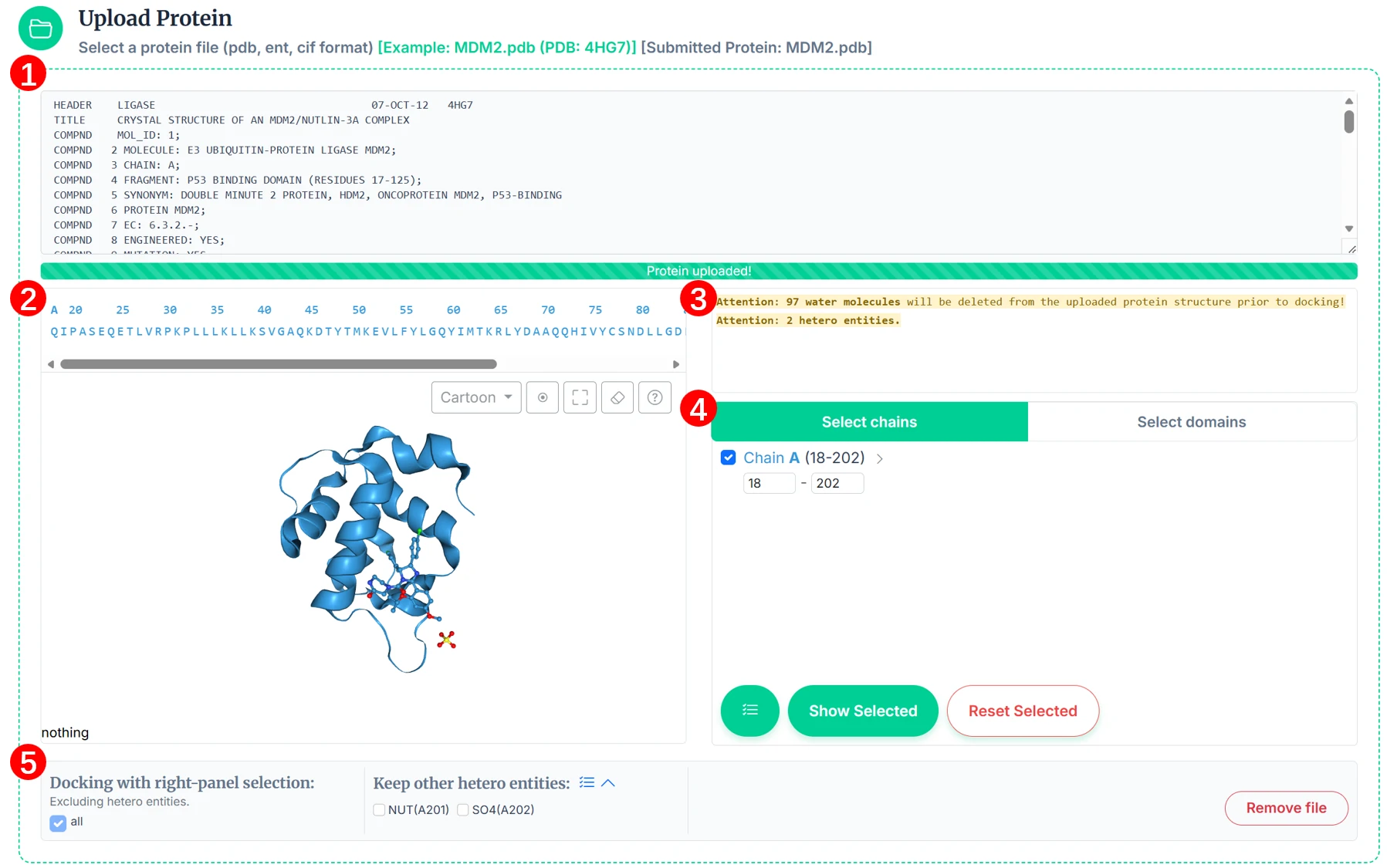
1. Upload Protein and Choose Regions for Docking
Submit a PDB/CIF/ENT file, visualize the structure, and select chains or domains to be used in docking.
1.1 File preview
After uploading, a text preview of the PDB/CIF/ENT content is shown. This helps you confirm the record and chain identifiers before selection.
1.2 Structure visualization
The interface provides two synchronized views:
- Sequence bar: Displays amino acid sequences and metal ions. Non-standard residues and hetero entities (e.g., ligands) are shown as “X”. The sequence bar supports left-click to highlight, middle-click to focus and highlight, and click-and-drag to highlight multiple amino acids.
- 3D NGL viewer: Visualizes the protein structure and interactions. The mouse operation and instructions for NGL viewer can be found in Section "View results". In the top-right corner of the NGL page, the icons represent the following functions: structure style (supports cartoon, stick_ball, and surface), center the view, toggle fullscreen, clear highlights (both in the sequence bar and in NGL), and help for mouse operations.
1.3 Attention panel
After uploading, the attention panel reports important structure details:
- Water molecules — removed by default before docking.
- Metal ions and other hetero entities.
- Chain breaks — reported with residue positions if detected.
1.4 Selection panel
Choose the docking region by chains or by domains.
- Select by chains/segements: Enable a chain and set residue ranges (e.g., 1–40, 60–100).
- Select by domains: Toggle one or more proposed domains for docking. CB-DOCK3 partitions domains automatically for easier selection.
Use Show Selected to apply and synchronize across all views, or Reset Selected to clear selections.
1.5 Selection summary and options
At the bottom, you can review and finalize what will be used for docking:
- Docking region: Lists selected chains and residue ranges (e.g., Chain B 146–249; Chain D 100–103).
- Keep options: Decide whether to retain metal ions or hetero entities such as ligands.
Tip: If your input is a biological assembly, you may split it into individual chains before docking (Split Chains).
2. Upload Query Ligand
The ligand can be uploaded in MOL2, MOL, SDF, or PDB format [Example file]. If the file format is MOL or SDF, we will convert it to PDB using Open Babel. Alternatively, you can draw a ligand with the JSME Molecule Editor embedded in our webserver.
3. Number of cavities for detecting
The Number of cavities detected by the template-independent method, and the default value is 5. Users can click "More parameters" to customize this value. The program will perform docking in each cavity and rank the cavities according to the best Vina score.
4. Template
This is an optional parameter, and users can choose to upload protein-ligand complex for template-based blinding docking.

5. Submit Jobs
Users can submit one "Search Cavities" job or "Auto Blind Docking" job at a time. Once the task is completed, you can click on the "View Result" in the task list to jump to the result page, then you can view or download the results under the result page. Or you can delete the task output from our server by clicking the "Remove" button on the task list. Additional, We will send the result email if users enter the eamil address.
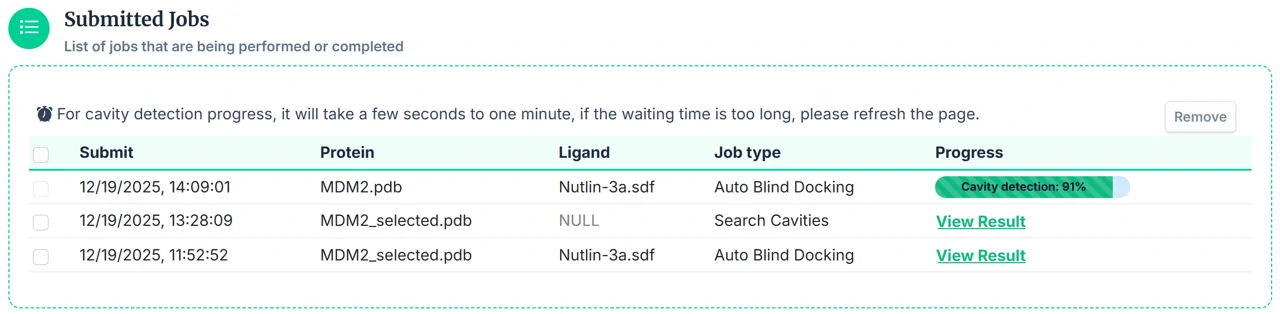
Tasks that are not manually deleted will be automatically deleted after one day, so please download and save your task output in time.
View results
For the two different tasks of "Search Cavities" and "Auto BlindDock", we provide plentiful visualization functions on the results page to help users preliminarily analyze the calculation results. Users can also download the data locally for further analysis.
Scroll wheel— ZoomMiddle-click— FocusLeft-click drag— RotateCtrl + left-click drag— PanDrag-*-middle— poor user experiencedrag-*-right— conflicts with Edge- 2 atoms — distance (Å)
- 3 atoms — angle (°)
- 4 atoms — dihedral angle (°)
-
Type Color Style Description Criterion Citations Hydrogen Bond 
Hydrogen-bond between strong donor and acceptor atoms. maxHbondDist: 3.5 Å
maxHbondSulfurDist: 4.1 Å
maxHbondAccAngle: 45 Å
maxHbondDonAngle: 45 Å
maxHbondAccPlaneAngle: 90
maxHbondDonPlaneAngle: 30
[1] Sulfur-containing H-bonds
[2] H-bondsWeak Hydrogen Bond 
Hydrogen-bond between a carbon donor atom and an acceptor, or a Pi group and a donor atom. [1] Sulfur-containing H-bonds
[2] H-bondsHydrophobic Interaction 
Interactions between alkyl groups, or a alkyl group and a Pi group. maxHydrophobicDist: 4 Å Halogen Bond 
Interactions with fluorine, chlorine, bromine or iodine atoms. maxHalogenBondDist: 4 Å
maxHalogenBondAngle: 30Ionic Interaction 
Interactions between pairs of oppositely charged groups. maxIonicDist: 5 Å Cation-Pi Interaction 
Interactions between a positively charged atom and the electrons of a delocalized Pi system. maxCationPiDist: 6 Å
maxCationPiOffset: 2 ÅPi-Pi Stacking 
Interactions between delocalized Pi systems. maxPiStackingDist: 5.5 Å
maxPiStackingOffset: 2 Å
maxPiStackingAngle: 30
1. Results of Search Cavities:
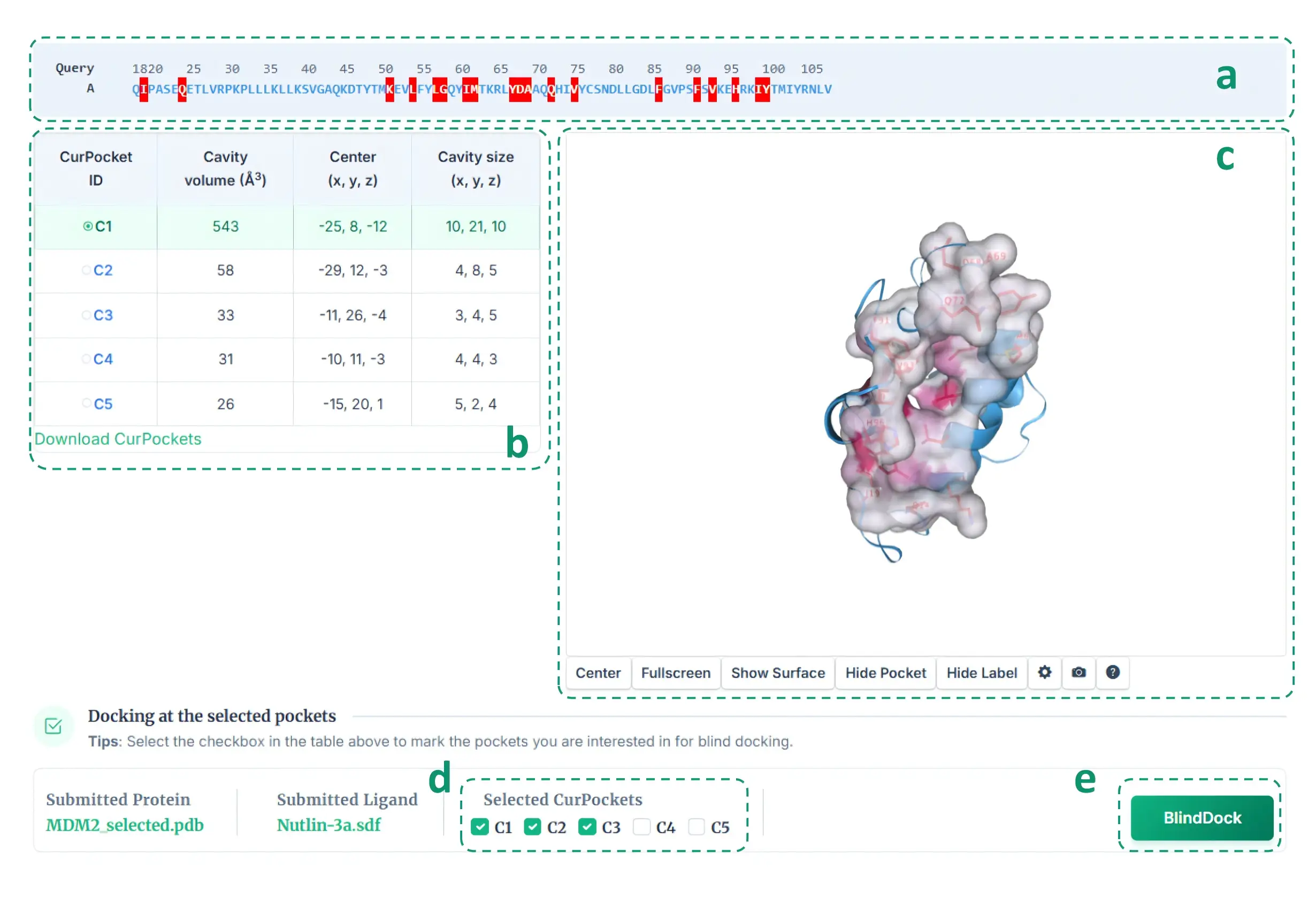
The cavity detection result interface is divided into two parts according to the detection method: Structure-based cavity detection and template-based cavity detection (performed in the case of having homologous templates). For structure-based cavity detection (as shown below), this section shows the whole sequence (a) of the query protein, and highlights the residues in each detected cavities (b). Users can click the residue in the sequence list to show it in 3D-view (c). The detected cavities is sorted by volume, and users can click on different cavity in the table to view the detailed structure information in 3D-view. In addition, users can check the cavities of interest (d) for molecular docking based on AutoDock Vina(e), so as to obtain the potential binding modes of query ligand in the target cavities.
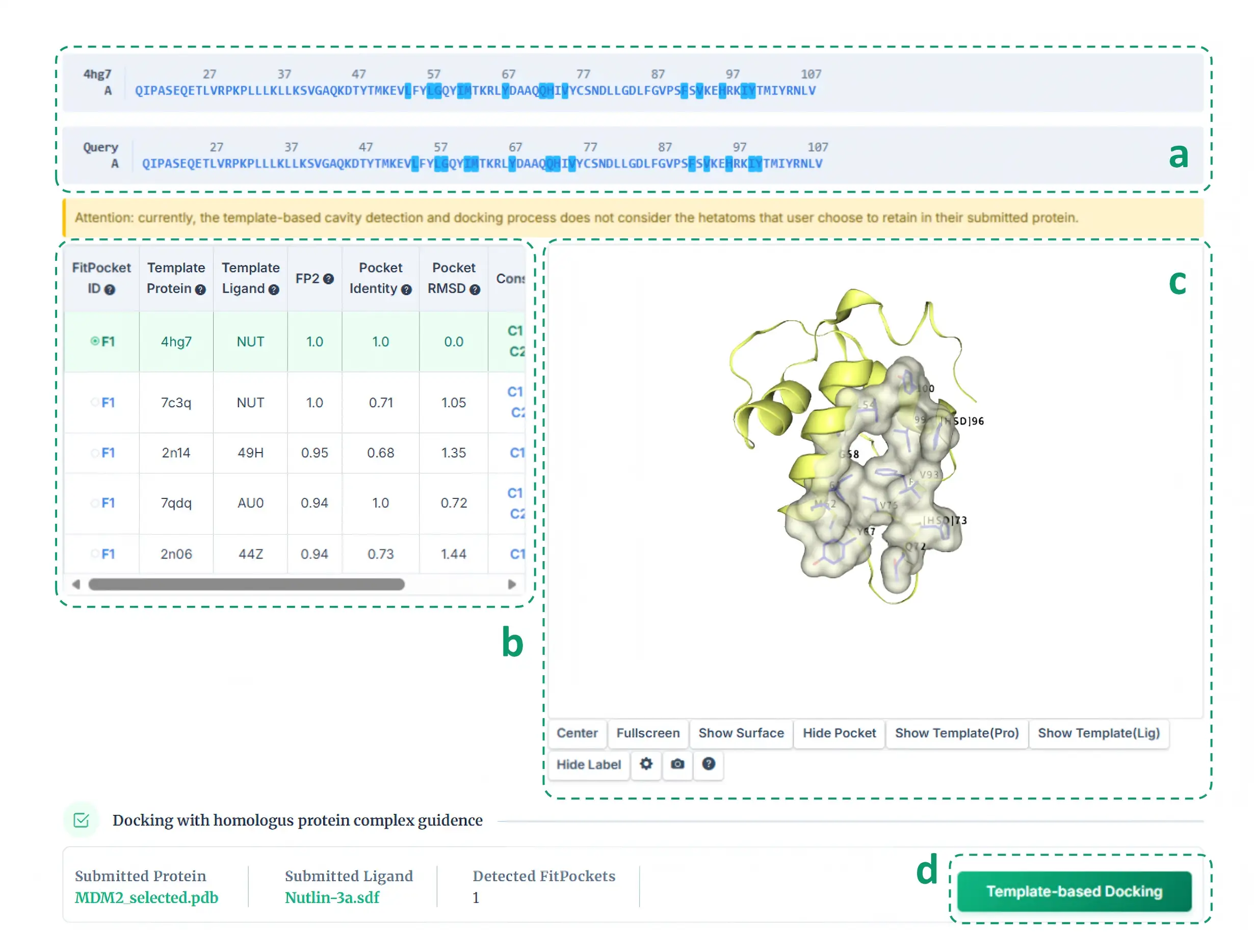
For template-based cavity detection (as shown below), this section shows the sequence alignment (a) of the query protein and the template protein, and highlights the pocket residues detected based on the template (b). Similarly, users can click the residue in the sequence list to show it in 3D-view (c). The detected pockets are first sorted according to FP2. If FP2 is the same, they are sorted by pocket identity. The pockets detected from different template, but with the same "FitPocket ID" in the table (b), have at least 50% pocket residues overlapped. In addition, our server automatically gives the consensus analysis between the pockets detected based on template and the pockets detected based on structure. Users can click the "Template-base Docking" (d) to view the binding modes of query ligand in the target pockets.
2. Results of Auto BlindDock:
The result interface of auto blind docking gives the predicted results based on two different blind docking principles.
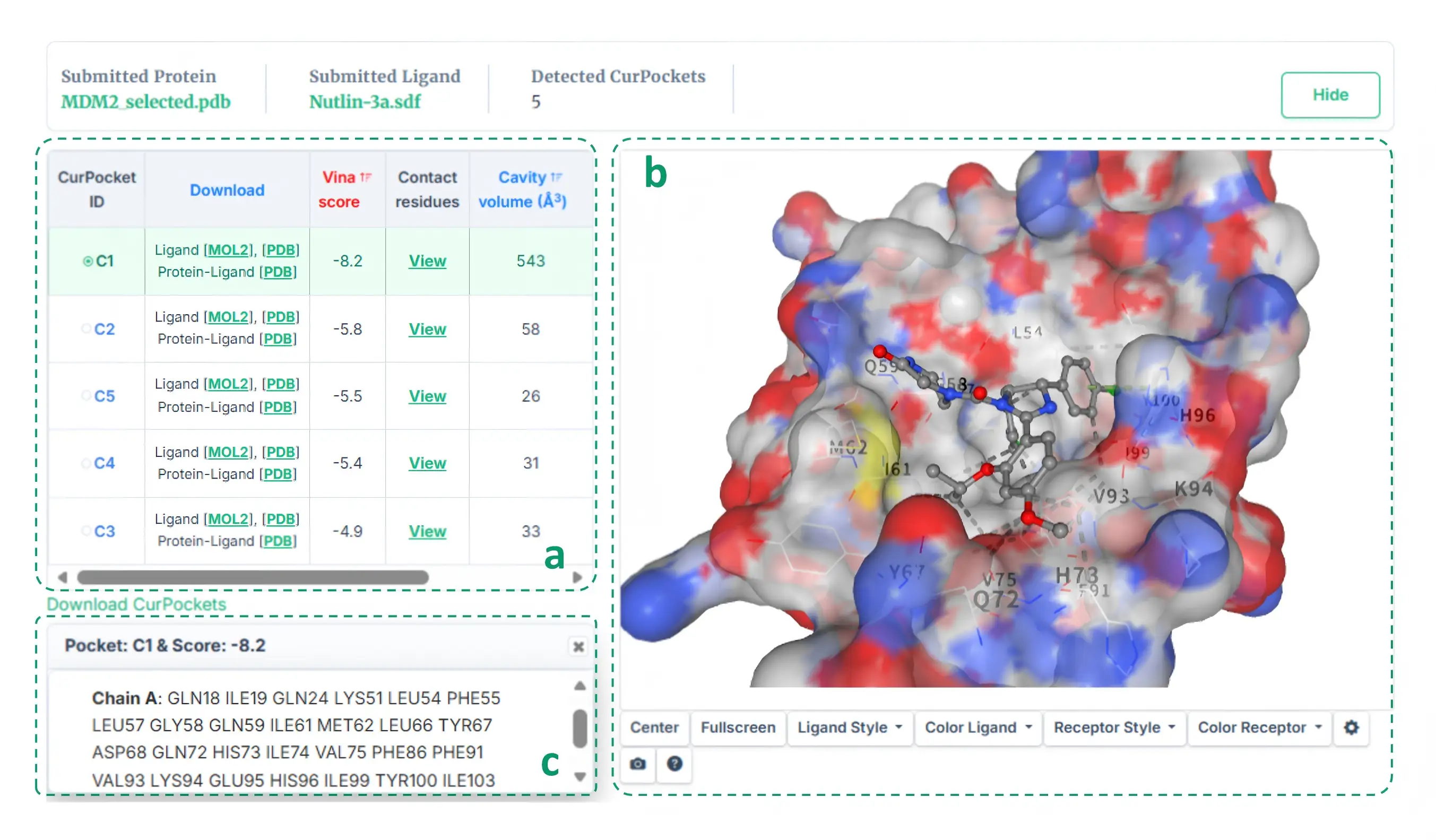
For structure-based blind docking (as shown below), the docking based on AutoDock Vina will be performed in each cavity detected. We rank the potential binding sites of the query ligand according to the docking score (kcal/mol).
Users can click the "View" button in the table (a) to view the contact residues (c) of the best binding mode in each pocket, combining the structural information in 3D-view (b).
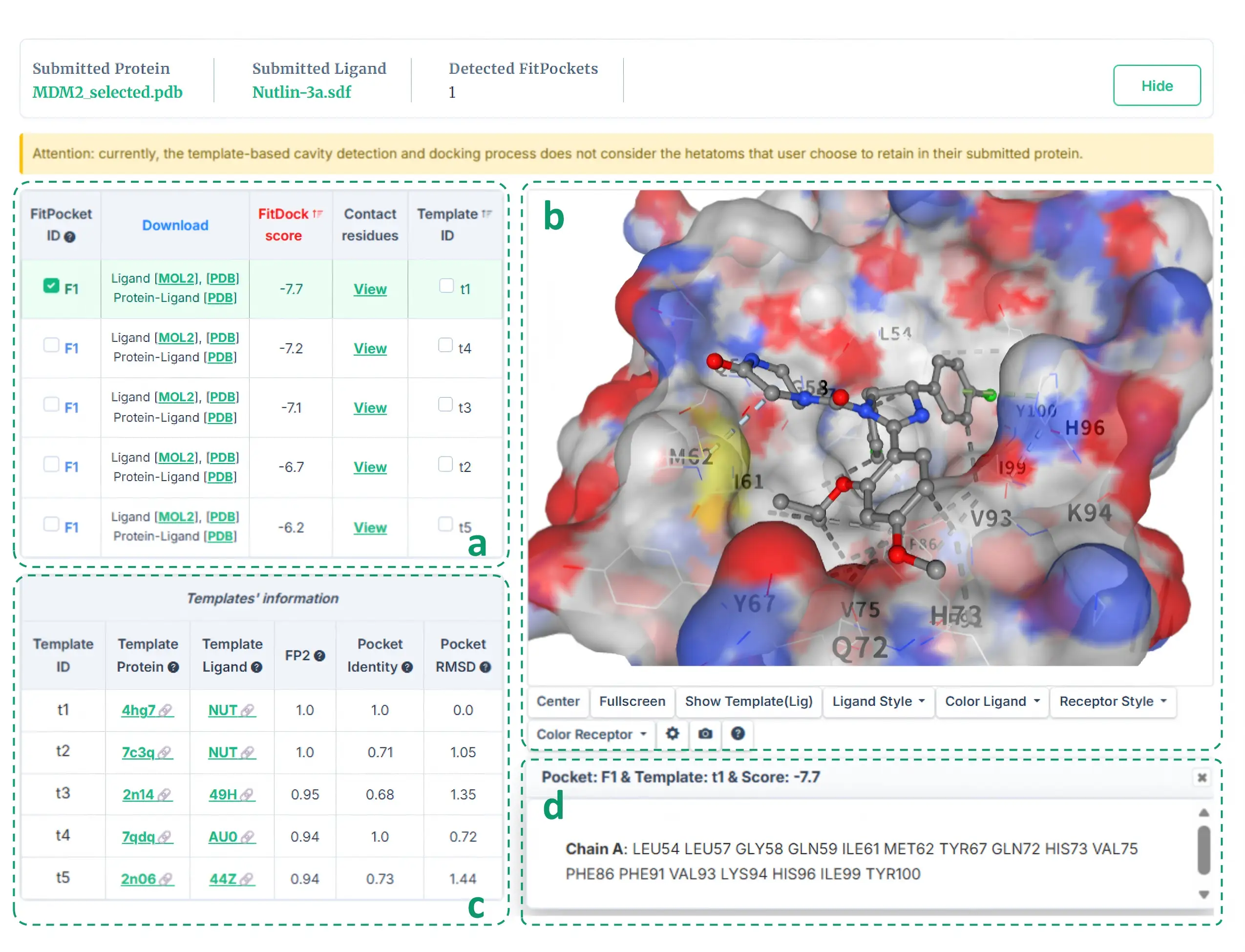
For template-based blind docking (as shown below), knowledge-based docking developed in house will be performed in each cavity detected. Similarly, we rank the potential binding sites of the query ligand according to the docking score (kcal/mol). The binding modes with the same "FitPocket ID" belong to different binding conformation in the same pocket. Users can determine the best binding conformation at a site according to the docking score, templates and the contact information. The tempaltes (c) and contact information (d) can be achieved from the table (a) and the 3D-view (b) by clicking the corresponding button.
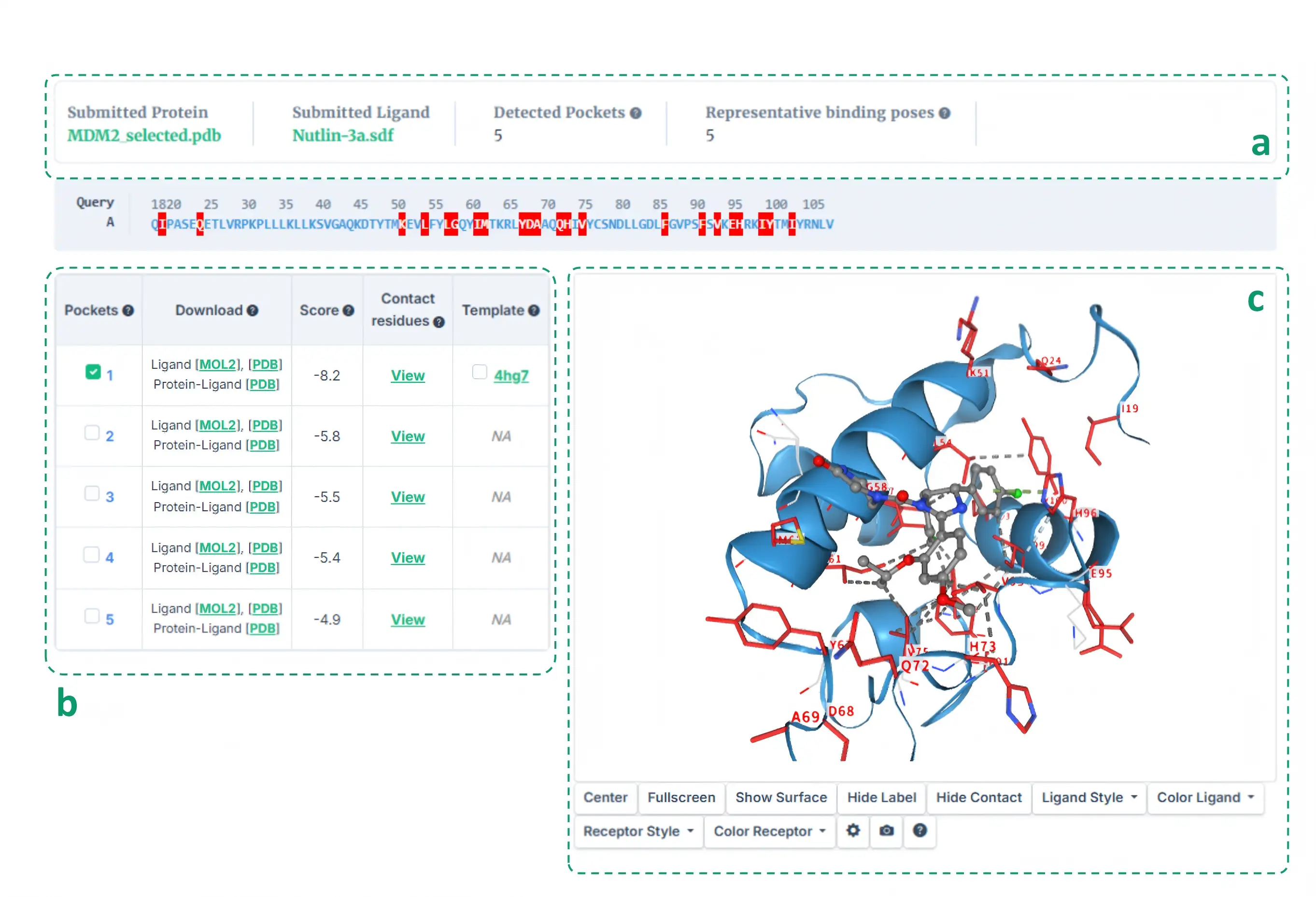
The meta-analysis integrated the results of the above two blind docking methods (as shown below). The cavities detected based on the above two methods will be clustered based on the overlap ratio of cavity residues (a, b). Since the structure-based and template-based blind docking methods may detect the same binding site and predict the binding poses of the query ligand based on AutoDock Vina and FitDock, respectively. In this situation, how to determine the best binding pose may be a concern for users. In case the templates are extracted, the RMSD between the best poses obtained by the two blind docking methods will be calculated, and if the RMSD is less than 2 Å, the pose with the lower score is chosen as the best prediction, otherwise the pose generated by template-based blind docking is selected as the best prediction. In the absence of templates, the pose obtained by structure-based blind docking is selected as the best prediction (a, b). Users can preview the integrated pockets and the best binding pose for each pocket via NGL-viewer (c).
3. NGL
3.1 NGL Mouse Controls
More mouse actions are documented in the NGL GitHub page .
3.2 Measurement
Right-click on 2–4 atoms in sequence, and right-click again on the last atom you selected to finalize the operation.
To remove a measurement, repeat the same picking sequence on the identical atoms.
3.3 Contact type in NGL-viewer:
Issues summary
-
Browser Compatibility
We tested CB-Dock3 using the latest versions of IE, Edge, Firefox, Chrome and Safari. Browser compatibility is shown in the table below. If you are using one of the before mentioned browsers and you have problems displaying the “Results” page, we recommend you to update your browser to the latest version. Some browsers may not support WebGL or do not support all WebGL features needed by NGL viewer like Opera. Please try another browser in the case you get a warning that WebGL is not supported or the example provided by us on the “Results” page is not visible.
OS Chrome(v96) Firefox(v88)
 Edge(v96)
 Safari
Linux (ubuntu18) Windows10 MacOS -
Why can't I receive the result email ?
The mail may be identified as spam. You may need to check in the trash can and add our account to the whitelist.
-
Why does the url in the results email not show the results ?
Your submission may have expired as the server only saves the results for one day.
Publications
Yang Liu, Xiaocong Yang, Jianhong Gan, Shuang Chen, Zhi-Xiong Xiao, Yang Cao . CB-Dock2: improved protein-ligand blind docking by integrating cavity detection, docking and homologous template fitting. Nucleic Acids Research, 2022.
Xiaocong Yang, Yang Liu, Jianhong Gan, Zhi-Xiong Xiao, Yang Cao . FitDock: protein-ligand docking by template fitting. Briefings In Bioinformatics, 2022.
Yang Liu, Maximilian Grimm, Wen-Tao Dai, Mu-Chun Hou, Zhi-Xiong Xiao, Yang Cao . CB-Dock: a web server for cavity detection-guided protein–ligand blind docking. Acta Pharmacologica Sinica, 2019.
Yang Cao , Lei Li. Improved protein-ligand binding affinity prediction by using a curvature dependent surface area model. Bioinformatics, 2014.
Privacy policy
Data and results of each user are not accessible to other users, but we cannot guarantee full privacy.
Data retention policy
Data and results will be stored on the server only for a limited amount of time. The content of the server will be periodically deleted.
Currently we delete data after one day, users may directly delete the data stored on our server, using the Remove button under Dock.
We reserve the right to adjust the data retention policy depending on the workload of our server.
Cookie notice
In order to provide the CB-Dock3 service, this server uses cookies. The cookies are used solely for the purpose to display the correct results for each user. If you want to use the CB-Dock3, you need to accept the session cookie, otherwise the service can not be used. We don't use any third party cookies.